 Agent Messenger
TUI (Terminal UI)
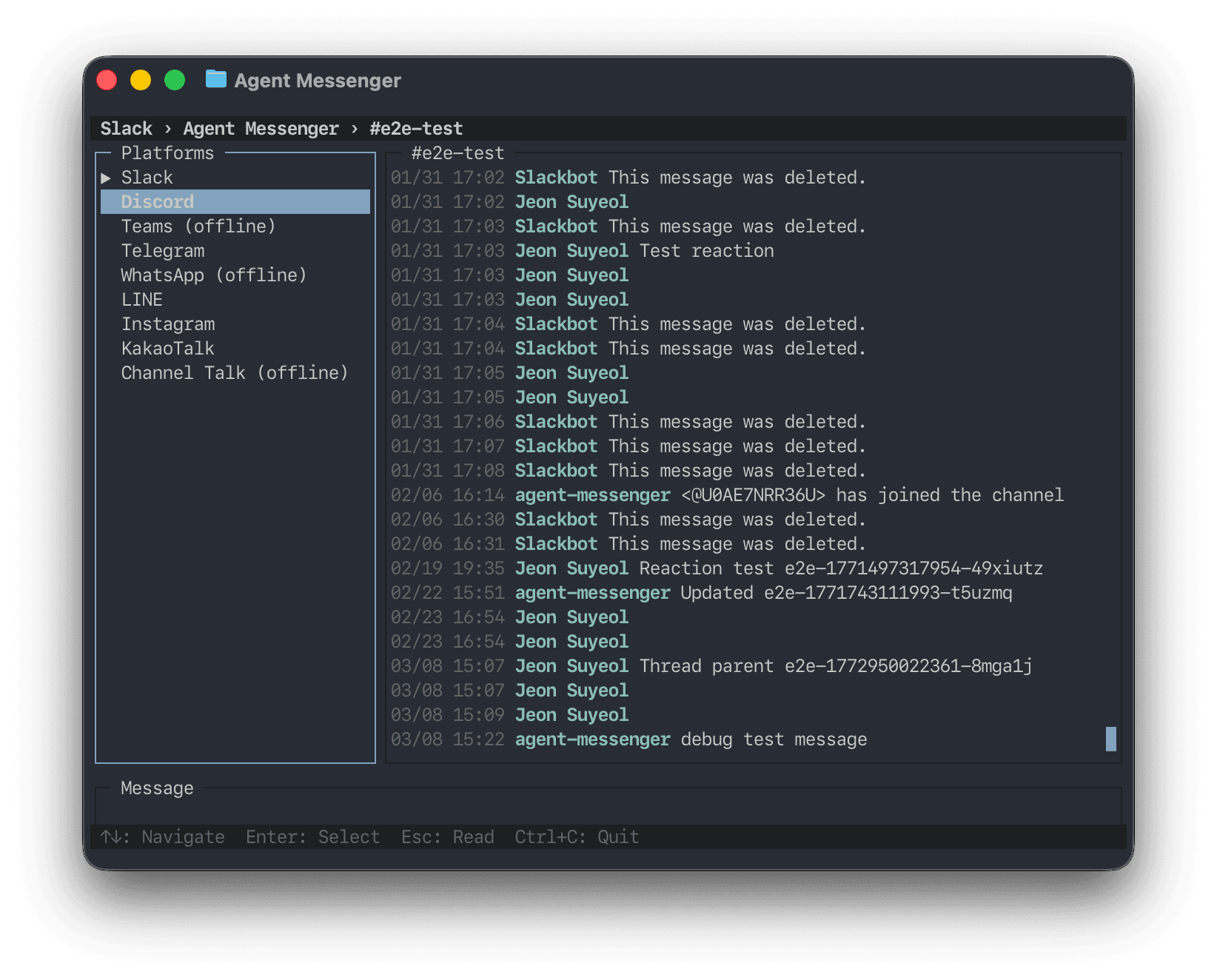
A unified terminal interface for all your messaging platforms in one screen.
Experimental — The TUI is a showcase of what's possible with Agent Messenger's SDK. It's not intended for production use, but demonstrates the power of having a unified adapter layer across 11 messaging platforms.
What Is It?
The TUI (Terminal User Interface) is a blessed-based interactive terminal app that unifies all your messaging platforms into a single screen. Navigate between Slack, Discord, Teams, Webex, Telegram, WhatsApp, iMessage, LINE, Instagram, KakaoTalk, and Channel Talk — all from your terminal.
Launch
agent-messenger tuiOn startup, the TUI attempts to log in to all platforms simultaneously using your stored credentials. Platforms that authenticate successfully appear as available; the rest show as "(offline)" and can be authenticated interactively.
If only one platform succeeds, it auto-selects and jumps straight to the channel list.
Navigation
The TUI has three navigation levels and three input modes.
Navigation Levels
| Level | What it shows | How to enter |
|---|---|---|
| Platform | All 11 platforms with online/offline status | Launch or press Esc from workspace level |
| Workspace | Workspaces for the selected platform (skipped if only one) | Select a platform |
| Channel | Channels in the current workspace | Select a workspace |
Input Modes
| Mode | Focus | What you can do |
|---|---|---|
| Selection | Sidebar | Navigate platforms, workspaces, and channels |
| Read | Message log | Scroll through messages, switch to write mode |
| Write | Input box | Type and send messages |
Keybindings
| Key | Context | Action |
|---|---|---|
↑ ↓ | Sidebar | Navigate items |
Enter / → | Sidebar | Drill into selected item |
← / Esc | Sidebar | Go back one level |
Enter | Read mode | Switch to write mode |
Esc | Read mode | Switch to selection mode |
Enter | Write mode | Send message |
Esc / Tab | Write mode | Switch to read mode |
Tab / Shift+Tab | Read/Write | Toggle between read and write |
Ctrl+K | Any (non-auth) | Fuzzy channel picker |
Ctrl+W | Read/Write | Fuzzy workspace picker |
Ctrl+C | Any | Quit |
Features
Multi-Platform Login
All platforms authenticate in parallel on startup. The TUI reuses credentials already stored by each platform's CLI (e.g., agent-slack auth extract). Platforms that haven't been set up appear as "(offline)" — select them to trigger an interactive auth flow right in the TUI.
Real-Time Messages
For platforms with listener support (Slack and Discord), new messages appear in real time. The listener starts automatically when you open a channel.
Fuzzy Pickers
Press Ctrl+K to open the channel picker or Ctrl+W for the workspace picker. Both support fuzzy matching — just start typing to filter.
Interactive Auth
If a platform isn't authenticated, selecting it in the sidebar starts an interactive auth flow. The TUI prompts for any required input (phone numbers, pairing codes, etc.) directly in the message pane.
Architecture
The TUI demonstrates the adapter pattern at the core of Agent Messenger:
┌─────────────┐
│   TUI App   │  blessed screen, views, key bindings
├─────────────┤
│  Adapters   │  PlatformAdapter interface (one per platform)
├─────────────┤
│  SDK Layer  │  SlackClient, DiscordClient, TeamsClient, ...
└─────────────┘
Each platform implements the PlatformAdapter interface:
interface PlatformAdapter {
  readonly name: string
  login(): Promise<void>
  getChannels(): Promise<UnifiedChannel[]>
  getMessages(channelId: string, limit?: number): Promise<UnifiedMessage[]>
  sendMessage(channelId: string, text: string): Promise<void>
  startListening?(onMessage: (msg: UnifiedMessage) => void): Promise<void>
  stopListening?(): void
  getWorkspaces?(): Promise<Workspace[]>
  switchWorkspace?(workspaceId: string): Promise<void>
  getCurrentWorkspace?(): Workspace | null
  getAuthHint(): AuthHint
  authenticate(io: AuthIO): Promise<void>
}
This means adding a new platform to the TUI is just implementing one adapter — the same SDK clients that power each CLI also power the TUI.
Source
The TUI source lives in src/tui/:
src/tui/
├── app.ts                          # Main app (screen, layout, modes)
├── cli.ts                          # CLI entry point
├── utils.ts                        # Timestamp formatting, fuzzy match, etc.
├── adapters/
│   ├── types.ts                    # PlatformAdapter interface
│   ├── slack-adapter.ts
│   ├── discord-adapter.ts
│   ├── teams-adapter.ts
│   ├── webex-adapter.ts
│   ├── telegram-adapter.ts
│   ├── whatsapp-adapter.ts
│   ├── imessage-adapter.ts
│   ├── line-adapter.ts
│   ├── instagram-adapter.ts
│   ├── kakaotalk-adapter.ts
│   └── channeltalk-adapter.ts
└── views/
    ├── channel-picker.ts           # Ctrl+K fuzzy channel search
    └── workspace-picker.ts         # Ctrl+W fuzzy workspace search